I just tried to make my kids' computer usable by one, M. Wife.
She needed primopdf, so I installed it for her. Then it didn't work. Nothing would print, no errors, nothing.
After playing with it a bit, taking the "push all the buttons" approach, I finally managed to get an actual error message in place of the nothingness:
The application failed to initialize properly (0xc0000135)
Copy/paste in Google. Voila. It shows up a zillion times in almost any app you can think of, and the explanation - the dot-Net framework is missing. OK, so now I'm downloading the thing, and we'll be back up and running in no time. I guess my kids never needed the .Net framework.
Now I gotta ask a series of how is it questions :
1) How is it that M$ expects the .Net framework to be so mighty popular, and they still haven't implemented a decent error message of "please install the .Net framework" if it's not found ?
2) How is it that MS themselves did not use the .Net framework for Office 2007 ? (I have office on this machine, and it worked without it). Not good enough for them ?
3) How is it that when I write "download .Net framework" in any search engine including Bing, I get v2.0 as the first result, whereas v3.5 only comes second, and v3.5sp1, which is the newest one may or may not show up depending on which search engine I use?
So many stupid questions, so little time...
Saturday, February 6, 2010


Tuesday, February 2, 2010
Google pulling the plug on IE6...
Hip Hip ! (if you didn't hooray, you must have been asleep in the last couple of years. Or maybe you're not a web developer)
I just got the email below. Finally someone picking up the check, if not Microsoft, then at least their rivals ;)
I just got the email below. Finally someone picking up the check, if not Microsoft, then at least their rivals ;)
Dear Google Apps admin,
In order to continue to improve our products and deliver more sophisticated features and performance, we are harnessing some of the latest improvements in web browser technology. This includes faster JavaScript processing and new standards like HTML5. As a result, over the course of 2010, we will be phasing out support for Microsoft Internet Explorer 6.0 as well as other older browsers that are not supported by their own manufacturers.
We plan to begin phasing out support of these older browsers on the Google Docs suite and the Google Sites editor on March 1, 2010. After that point, certain functionality within these applications may have higher latency and may not work correctly in these older browsers. Later in 2010, we will start to phase out support for these browsers for Google Mail and Google Calendar.
Google Apps will continue to support Internet Explorer 7.0 and above, Firefox 3.0 and above, Google Chrome 4.0 and above, and Safari 3.0 and above.
Starting this week, users on these older browsers will see a message in Google Docs and the Google Sites editor explaining this change and asking them to upgrade their browser. We will also alert you again closer to March 1 to remind you of this change.
In 2009, the Google Apps team delivered more than 100 improvements to enhance your product experience. We are aiming to beat that in 2010 and continue to deliver the best and most innovative collaboration products for businesses.
Thank you for your continued support!
Sincerely,
The Google Apps team
Email preferences: You have received this mandatory email service announcement to update you about important changes to your Google Apps product or account.
Google Inc.
1600 Amphitheatre Parkway
Mountain View, CA 94043
Sunday, January 17, 2010
Great stuff on Google Docs
This morning I opened up Google Docs and got this message.
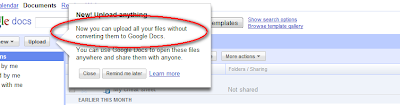
This means that you can use Google as a repository for your documents in their original form (docx, for instance). Sort of like a G-Drive for office documents. A first step in the right direction, I guess (I'm really waiting for a functional G-Drive that would work like DropBox).
Note that when you upload a doc to Google Docs now, you can uncheck a box that says "convert to Google format. That's all there is to it.
Good work G-folks !

This means that you can use Google as a repository for your documents in their original form (docx, for instance). Sort of like a G-Drive for office documents. A first step in the right direction, I guess (I'm really waiting for a functional G-Drive that would work like DropBox).
Note that when you upload a doc to Google Docs now, you can uncheck a box that says "convert to Google format. That's all there is to it.
Good work G-folks !
Thursday, December 10, 2009
My blog posts technical ranking
Tech-rank: 1
I figured I'd rank my blog posts between 1 and 10 on a "technical" scale, one being completely non-technical, 10 being hard-core stuff that even programmers may not find interesting if it's not exactly in their area of expertise.
I'll just add it up there, on the post itself, if I remember.
I figured I'd rank my blog posts between 1 and 10 on a "technical" scale, one being completely non-technical, 10 being hard-core stuff that even programmers may not find interesting if it's not exactly in their area of expertise.
I'll just add it up there, on the post itself, if I remember.
Morning blog1 - Windows 7
Tech rank for this post: 5
I read a blog post from someone who suggested that instead of reading emails in the morning, or reading the paper - you should maybe write a blog post. I figured that's not such a bad idea. I've made a habit out of making note of every subject worth blogging, so that I remember to write that blog post later on. In recent months I've been working 18 hour days, so blog posts weren't exactly my priority. Seems like I should have plenty of items to write blog posts about, but when I went over the list just now, many subjects seemed kind of old.
One of those subjects was "Windows 7, good and bad". I remember that this issue went through my head after I installed W7 Release Candidate on some relatively old machine that had to be reinstalled. I could immediately see that this IS something different - not another Vista (as a side note - I nicknamed Vista "the new ME" -named after the notorious Windows ME, yet another operating system that everyone skipped and went directly to Windows 2000).
The first thing I noticed about Windows 7 is that its name fits its Hard drive footprint. After you install Vista, 7Gb of your HD are gone (if you really must know why it's called that way - I found this post from the team). Not so long ago, 10Gb was acceptable, and 20Gb was plenty. Well, these days are over, and in the age of smallest HD being 160Gb, that's fine.
Being such a negative person, I had to find something bad to write about W7 - hence that "complaint" about footprint above, but honest to g-d, other than this W7 turned out to be my next XP (as opposed to Vista being compared to ME).
The UI finally makes sense (Mac anyone?). Seriously. Check this out:

(note there's a new Windows+tab app switcher that does this 3D effect of switching between windows)
I always wanted a Desktop that looks this cool. W7 finally takes you there very easily. I'm even persuaded not to turn off all the fancy animation bits that hurt performance. A quad-core with 4Gb of memory has its advantages. If your machine isn't that strong, the OS will decide on its own to deactivate some of the fancy-shmancy stuff.
I could go on forever, but this morning blog would become afternoon blog, and there are plenty of other reviews of W7 out there.
Just a couple more notes -

1) I am not usually an early adopter when it comes to OS, because I need to be productive, and don't have time to deal with v1 kinks. In this case it so much happened that I started to use virtualization on a large scale, and had to move to a 64-bit OS just in order to make better use of my RAM. My brother persuaded me that there's a good chance the 64-bit version of W7 works better than the XP one, and it actually made sense to me. I installed it knowingly, thinking that I'd run back to XP if anything goes wrong. It has been up there for a few weeks now, and for all practical purposes - I strongly recommend it to anyone with a reasonably modern machine (Dual core, >=2Gb RAM). Incidentally, I don't recommend the 64-bit, unless you truly know that you need it. It works fine, but if you're not a hard-core programmer, don't bother. 95% of the software is still 32-bit anyways. Most work fine on 64, but why bother having a bi-polar machine.
2) I know that it's really hansom, but we've always been to look at what's in the box, rather than the box itself. I can honestly say that finally the UI starts to make sense to me. Windows, to me, has always been about working AROUND its UI, rather than simply using an enjoying it. I've got plenty of productivity tools installed on XP machines, covering up for things that Microsoft just didn't do so well. I'm talking about trivial stuff like the windows explorer, notepad, clipboard, and a whole bunch of others (can you smell that next blog post coming?). With windows 7, there's a bit less of that, and a bit more usage of the tools that come out of the box. That's one nice thing.
But the nicest thing for me is that the entire UI and its behavior makes sense. My taskbar never gets filled up, and yet I can find all of my open programs easily, and this whole quicklaunch toolbar thing finally makes sense in its new form (again, behavior gracefully "stolen" from Mac).

Bottom line - go get one.
If you're a startup that fits MS relatively loose standards, you can get it free, along with every other piece of Software M$ usally sells for thousands of dollars. It's called Bizspark, and it's a good subject for another blog post.
Enjoy.
I read a blog post from someone who suggested that instead of reading emails in the morning, or reading the paper - you should maybe write a blog post. I figured that's not such a bad idea. I've made a habit out of making note of every subject worth blogging, so that I remember to write that blog post later on. In recent months I've been working 18 hour days, so blog posts weren't exactly my priority. Seems like I should have plenty of items to write blog posts about, but when I went over the list just now, many subjects seemed kind of old.
One of those subjects was "Windows 7, good and bad". I remember that this issue went through my head after I installed W7 Release Candidate on some relatively old machine that had to be reinstalled. I could immediately see that this IS something different - not another Vista (as a side note - I nicknamed Vista "the new ME" -named after the notorious Windows ME, yet another operating system that everyone skipped and went directly to Windows 2000).
The first thing I noticed about Windows 7 is that its name fits its Hard drive footprint. After you install Vista, 7Gb of your HD are gone (if you really must know why it's called that way - I found this post from the team). Not so long ago, 10Gb was acceptable, and 20Gb was plenty. Well, these days are over, and in the age of smallest HD being 160Gb, that's fine.
Being such a negative person, I had to find something bad to write about W7 - hence that "complaint" about footprint above, but honest to g-d, other than this W7 turned out to be my next XP (as opposed to Vista being compared to ME).
The UI finally makes sense (Mac anyone?). Seriously. Check this out:

(note there's a new Windows+tab app switcher that does this 3D effect of switching between windows)
I always wanted a Desktop that looks this cool. W7 finally takes you there very easily. I'm even persuaded not to turn off all the fancy animation bits that hurt performance. A quad-core with 4Gb of memory has its advantages. If your machine isn't that strong, the OS will decide on its own to deactivate some of the fancy-shmancy stuff.
I could go on forever, but this morning blog would become afternoon blog, and there are plenty of other reviews of W7 out there.
Just a couple more notes -

The new paint
1) I am not usually an early adopter when it comes to OS, because I need to be productive, and don't have time to deal with v1 kinks. In this case it so much happened that I started to use virtualization on a large scale, and had to move to a 64-bit OS just in order to make better use of my RAM. My brother persuaded me that there's a good chance the 64-bit version of W7 works better than the XP one, and it actually made sense to me. I installed it knowingly, thinking that I'd run back to XP if anything goes wrong. It has been up there for a few weeks now, and for all practical purposes - I strongly recommend it to anyone with a reasonably modern machine (Dual core, >=2Gb RAM). Incidentally, I don't recommend the 64-bit, unless you truly know that you need it. It works fine, but if you're not a hard-core programmer, don't bother. 95% of the software is still 32-bit anyways. Most work fine on 64, but why bother having a bi-polar machine.
2) I know that it's really hansom, but we've always been to look at what's in the box, rather than the box itself. I can honestly say that finally the UI starts to make sense to me. Windows, to me, has always been about working AROUND its UI, rather than simply using an enjoying it. I've got plenty of productivity tools installed on XP machines, covering up for things that Microsoft just didn't do so well. I'm talking about trivial stuff like the windows explorer, notepad, clipboard, and a whole bunch of others (can you smell that next blog post coming?). With windows 7, there's a bit less of that, and a bit more usage of the tools that come out of the box. That's one nice thing.
But the nicest thing for me is that the entire UI and its behavior makes sense. My taskbar never gets filled up, and yet I can find all of my open programs easily, and this whole quicklaunch toolbar thing finally makes sense in its new form (again, behavior gracefully "stolen" from Mac).

Bottom line - go get one.
If you're a startup that fits MS relatively loose standards, you can get it free, along with every other piece of Software M$ usally sells for thousands of dollars. It's called Bizspark, and it's a good subject for another blog post.
Enjoy.
Subscribe to:
Posts (Atom)